The Contractor’s Photo Documentation Checklist for Every Insurance Claim


Table of Contents
- What Insurance Adjusters Actually Look For in Your Claim Photos
- The Essential Photo Sequence Every Contractor Should Follow
- Photo Documentation Checklists by Claim Type
- Common Photo Mistakes That Delay Claims and Cost Contractors Money
- How to Organize and Submit Photos for Fast Approval
- How Claim Supplement Pro Uses Your Documentation to Maximize Payouts
- Frequently Asked Questions About Photo Documentation for Insurance Claims
- Your Photos Are Your Paycheck
You can have a legitimate claim with clear damage, and still hit delays or pushback for one simple reason: the photos didn’t tell the full story.
It happens more often than most contractors expect. A supplement gets held up, not because the damage isn’t there, but because the documentation leaves too much open to interpretation. Missing angles, unclear context, no close-ups, no sequence—it forces the adjuster to question what should have been obvious.
Most contractors already know they need photos for insurance claims. The real issue is this: very few know exactly which photos adjusters are looking for, in what order they expect to see them, and how those photos tie directly into approvals, scope accuracy, and payout speed.
That’s where our guide comes in.
This isn’t a general photography guide. It’s a field-ready checklist system built from real claim supplement work, covering roofing, water, fire, and commercial losses. We’ll walk through what adjusters actually look for, the exact photo sequence that supports your estimate, the mistakes that slow claims down, and how to organize everything so your documentation works for you, not against you.
If your goal is faster approvals, fewer revisions, and more accurate payouts, it starts with how you document the job.
What Insurance Adjusters Actually Look For in Your Claim Photos
Adjusters aren’t judging how talented a photographer you are; they’re trying to answer a specific set of questions before they can approve payment.
Every claim review comes down to five things:
- What is damaged?
Clear identification of materials and affected areas. - How extensive is the damage?
Scale, measurements, and overall spread. - What caused the damage?
Evidence of the source—hail hits, water entry, impact points. - Is it new or pre-existing?
Context, condition, and timestamps. - Does the scope match the photos?
Every line item in the estimate should be backed by visual proof.
Most adjusters review dozens of claims each week. They don’t have time to sort through disorganized photo dumps. What they respond to is clear, structured documentation that answers these questions quickly.
When taking pictures for insurance claims, cover all five points in context, so you reduce back-and-forth and move the claim forward faster.
How Carriers Verify and Authenticate Claim Photos
Photos aren’t just reviewed; they’re often checked behind the scenes.
Many carriers look at metadata embedded in the file, like timestamps, GPS location, and device details. Some will also compare your photos directly with the adjuster’s initial inspection to make sure everything lines up.
More recently, some carriers have started using AI tools to flag inconsistencies like duplicated images, unusual edits, or details that don’t match the reported loss.
The takeaway is simple: don’t over-edit your photos. Verifying photos in insurance claims implies avoiding heavy cropping or anything that strips context or metadata. Clear timestamps and location data only strengthen your credibility and make your documentation easier to trust.
The Direct Connection Between Photos and Xactimate Line Items
Every line item in your estimate should be backed by a photo. If the adjuster can’t see it, it’s much harder to justify paying for it.
This is how professional supplementing works in practice. Photos for insurance claims aren’t just collected—they’re cross-referenced against Xactimate line items to make sure every part of the scope is supported. That’s what turns an estimate into something carriers can actually approve.
For example, if you’re including detach-and-reset for fixtures, your photos should show:
- The fixture itself
- Its location relative to the damage
- Its condition before any work begins
Without that, the line item becomes easy to question.
A simple habit makes a big difference: as you take photos, think about the line items they support. That shift alone can dramatically improve approval rates and reduce revisions.
If you want to go deeper into building estimates that align with your documentation, this Xactimate estimating guide is a strong next step. And if you need help aligning your photos with a carrier-ready scope, our estimating services are built specifically for that.
The Essential Photo Sequence Every Contractor Should Follow
Documenting damage photos for claims isn’t just about what you capture; it’s about when and in what order. The most effective claims follow a simple three-phase structure:
- Pre-Work: Initial damage, site conditions, and cause
- In-Progress: Work being performed, materials exposed, steps taken
- Post-Work: Completed repairs and final condition
This sequence creates a clear visual story: what was damaged, what was done, and what the final result looks like. That’s exactly what adjusters need to move a claim forward without hesitation.
Phase 1 — Initial Damage Documentation (Before You Touch Anything)

This is your foundation. If this part is weak, everything after it gets questioned.
- Wide shots: Full structure or area from multiple angles to establish context
- Mid-range shots: Show where the damage sits within the space (roof slope, entire room)
- Close-ups: Clear, tight shots of the actual damage
- Measurements: Tape, gauge, or laser in frame to show scale
- Cause of loss: Source of damage (pipe, impact point, entry area)
Pro tip: Always move from wide → mid → close. Same sequence, every job.
Phase 2 — In-Progress and Hidden Damage Documentation
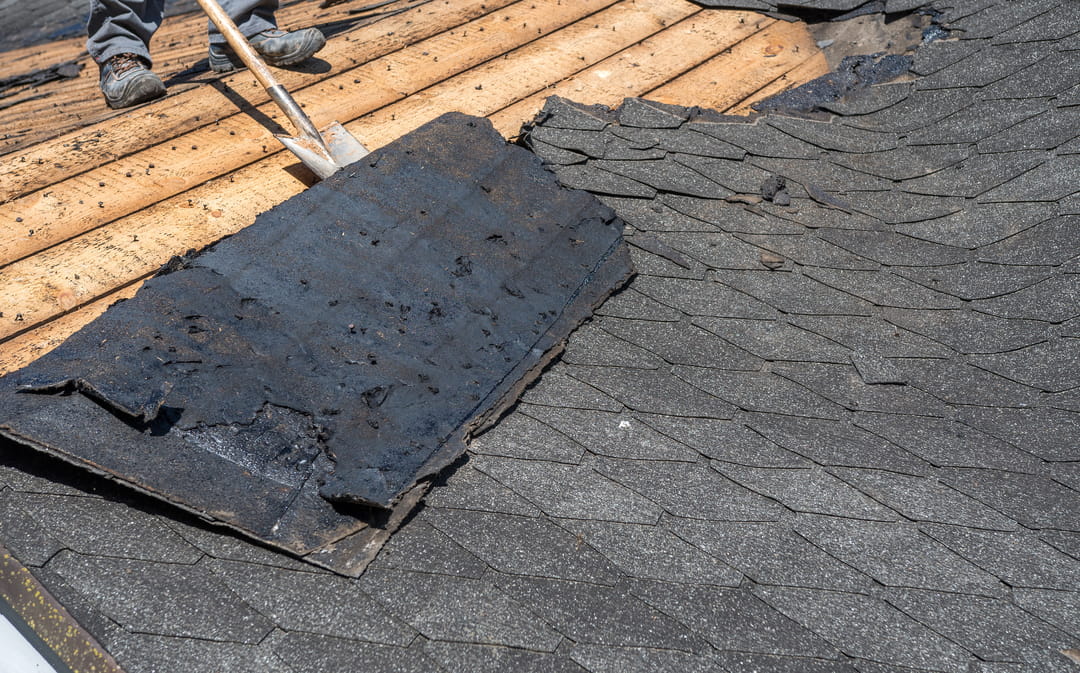
This is where many claims are won or lost. It proves what wasn’t visible at first.
- Demo photos: Materials after removal, before disposal
- Hidden damage: What you uncover behind walls, under roofing, beneath flooring
- Materials: Products in packaging with labels visible
- Progress milestones: Key stages before covering work (framing, insulation, etc.)
- Moisture readings (water claims): Meter readings against the surface
This phase justifies supplements and prevents “it wasn’t there before” questioning.
Phase 3 — Completed Work Documentation

This closes the loop and confirms the job was done right.
- Final photos: Same angles as initial shots for clear before/after
- Code items: Installed components that meet requirements
- Cleanup: Property left safe and clean
- Additional notes: Anything outside scope worth documenting
When all three phases are covered properly, your photos show damage and prove the entire job from start to finish.
Photo Documentation Checklists by Claim Type
The three-phase sequence stays the same on every job. What changes is what you need to capture.
Each claim type has specific photo expectations, and missing them is one of the fastest ways to slow down a supplement. Use the checklists below as a field reference your team can follow on every project.
Roofing Claim Photo Checklist
- Ground-level shots of all four elevations of the structure
- Full roof plane from multiple angles
- Close-ups of damaged shingles, flashing, vents, ridge (with gauge in frame)
- Decking condition after tear-off
- Underlayment, ice & water shield, drip edge installation
- Aerial or satellite measurement (drone, EagleView, HOVER)
- Code upgrades (ventilation, starter strip, material changes)
For more complex roofing claims needing thorough documentation to support supplements, our roofing supplement services can help ensure nothing is missed.
Water Damage and Mitigation Photo Checklist
- Wide shots of all affected rooms
- Close-ups of stains, swelling, warping, discoloration
- Source of water (pipe, appliance, entry point)
- Moisture readings with a visible meter display
- Equipment placement (air movers, dehumidifiers)
- Demo photos before disposal
- Drying progress and daily logs
If you want a deeper breakdown, this guide on documenting interior water damage for insurance supplements expands on these steps. Our water mitigation and flood supplement services help align documentation with carrier expectations.
Fire Damage Photo Checklist
- Wide exterior and interior shots of damage
- Close-ups of charring, soot, and heat impact
- Smoke patterns on walls and ceilings
- Damaged contents (furniture, electronics, personal items)
- Structural concerns (framing, warped materials)
- Board-up and temporary protection
Fire claims rely heavily on detailed documentation, so fire supplement services are built to support these high-scrutiny cases.
Commercial Property Photo Checklist
- Full exterior shots with visible address or signage
- Interior photos organized by unit, floor, or section
- Code-related items (ADA, fire systems, egress)
- Flat roof condition (membrane, seams, drainage)
- Mechanical systems (HVAC, electrical, plumbing)
- Height/access conditions (lifts, scaffolding needs)
Commercial claims tend to require a higher level of detail and organization, which is why commercial supplement services are carefully designed to support these larger, more complex projects.
Common Photo Mistakes That Delay Claims and Cost Contractors Money
Poor documentation can slow everything down or get parts of the claim pushed back. The issues we see most often when reviewing contractor submissions are the following:
- Close-ups without context
A tight shot of damage doesn’t help if no one knows where it is. Always pair it with a wider view showing the same area. Without context, adjusters can’t confirm scope. - Dark, blurry, or unclear photos
If it’s hard to see, it’s hard to approve. Use natural light when possible or a portable work light indoors. And clean your lens; this alone fixes a surprising number of issues. - No measurements in frame
Size drives pricing. Without a tape measure or scale reference, quantities become guesswork, and that slows approval. - Missing cause of loss
Document the source, not just the result. Pipe, flashing failure, impact point—this is what prevents causation disputes. - Too many unorganized photos
Sending hundreds of random images works against you. Adjusters prefer clear, relevant photos that support specific parts of the estimate. - No hidden damage documentation
Once materials are removed, that evidence is gone. Always photograph what you uncover during demo before moving forward, as this is what supports most supplements.
Many of these issues also lead to pricing gaps or reduced scopes. If you’ve already run into that, we can help you counter low estimates.
How to Organize and Submit Photos for Fast Approval
Even the best photos can get ignored if adjusters can’t quickly find what they need. Organization is just as important as image quality.
Naming and folder structure
Keep it simple and consistent: [Date]_[ClaimType]_[Area]_[Phase] (e.g., 2026-03-18_Roof_NorthElevation_PreWork). Organize by phase: Pre-Work, In-Progress, Hidden Damage, Completed Work, and add subfolders for rooms, floors, or building sections for multi-area claims. Tools like CompanyCam auto-organize with timestamps and GPS, but tagging and annotating for supplement clarity is still crucial.
Submission best practices
Ask the adjuster how they prefer to receive photos: email, cloud link, portal, or embedded in Xactimate. Embedding photos in the Xactimate report is ideal to prevent lost emails and keep everything in one place. Include a short photo index or summary mapping key images to line items, and avoid sending hundreds of uncurated files at once.
Build a photo story
Guide the adjuster logically—exterior to interior, undamaged context to specific damage, and pre-work to completed work. Add captions or annotations explaining what each photo shows and which line item it supports. Organizing your photos efficiently not only speeds up review but also reduces errors and lost evidence, which is why we recommend contractors streamline photo storage for a more efficient process before submitting any supplement.
How Claim Supplement Pro Uses Your Documentation to Maximize Payouts
Taking great photos is just the first step; getting paid depends on how that documentation is used. At Claim Supplement Pro, our supplement specialists review every contractor submission to uncover line items that the carrier’s initial estimate may have missed or under-scoped. Each photo is cross-referenced with Xactimate line items to create a supplement that clearly supports repairs, code upgrades, specialty labor, and material improvements.
We also organize photo packages in a way that minimizes adjuster pushback and speeds approval. Because our team reviews documentation daily across roofing, water, fire, and commercial claims, we know exactly what carriers expect and how to present it effectively. Contractors who want to ensure no line item is overlooked can leverage our estimating services or see what to do if an insurance claim was underpaid to protect their payout.
Frequently Asked Questions About Photo Documentation for Insurance Claims
How Many Photos Should I Take for an Insurance Claim?
There’s no set number—take enough to fully capture the damage. Focus on covering all areas, materials, and affected systems so adjusters can answer their five key questions without being overwhelmed by redundant shots.
Can I Use My Smartphone for Insurance Claim Photos?
Yes. Modern smartphones meet insurance documentation standards if you enable timestamps and GPS, use proper lighting, and check each photo for clarity before moving on.
What Happens If I Start Repairs Before Taking Photos?
You risk losing crucial baseline evidence. Always photograph the damage first. Even during emergency mitigation, snap quick shots of the source and affected areas before proceeding with repairs.
Do I Need to Take Photos If the Adjuster Already Inspected?
Yes. Adjuster inspections often miss hidden or secondary damage. Your own photos create the evidence needed for supplements, ensuring you can recover legitimate costs that might otherwise go unpaid.
How Do Claim Photos Help with Supplement Approval?
Each line item in a supplement needs photo support. Clear, organized documentation mapped to every line item gives adjusters everything they need, reducing review cycles and preventing delays caused by incomplete evidence.
Your Photos Are Your Paycheck
Photo documentation isn’t busywork—it’s how contractors protect their bottom line. A consistent, checklist-driven approach ensures every damaged area is captured, hidden issues are documented, and every Xactimate line item is fully supported. Implementing this system on your next job can prevent delays, reduce adjuster pushback, and accelerate payouts.
Strong documentation is the foundation. Expert supplementing turns it into revenue. Contact Claim Supplement Pro right away for a claim review and see how much more you could be recovering.